
Why Is Your Bakery Vacuum Cooler Stopping and How Do You Fix It Quickly?
You see an error code on the screen and panic. Your bread is cooling, lines are stalling, and you fear a costly technician visit is your only option.
Most vacuum cooler issues, like "Vacuum Time-Out" or "Overload," are simple operational errors. They are usually caused by dirty sensors, insufficient water flow, or a loose door seal. You can resolve 80% of these problems yourself without special tools.
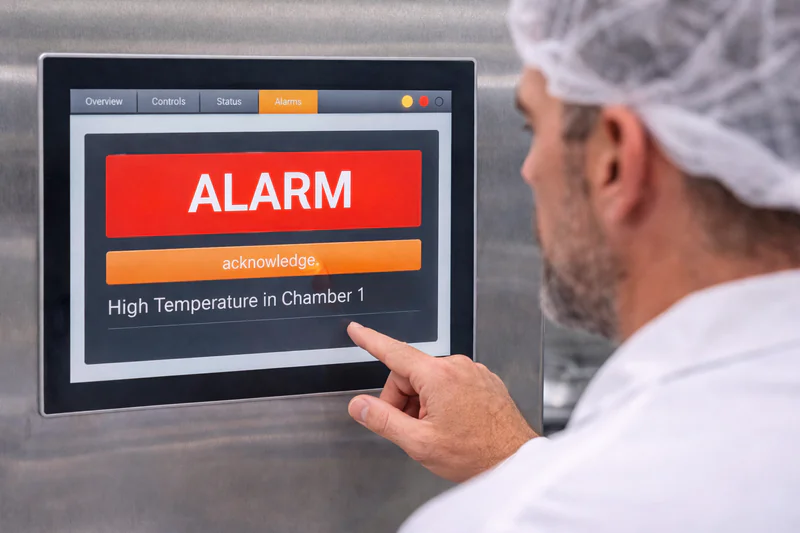
I have fielded hundreds of midnight calls from clients like Norman. The truth is, machines rarely "break" on their own; they usually just react to a bad condition. When a vacuum cooler stops, it is usually trying to tell you that something in the environment—the water, the air, or the operator—is not right. Instead of calling for a mechanic immediately, I encourage you to follow a simple process of elimination. This guide covers the three most common panic moments for our customers and how to solve them in minutes.
Why Is the Machine Taking Too Long to Reach the Target Vacuum Pressure?
You watch the pressure gauge drop slowly, delaying your entire production schedule. You worry the pump is broken, but often the culprit is just a tiny, invisible leak.
Slow evacuation is almost always due to a vacuum leak. Check the door gasket for flour debris, ensure the drain valve is fully closed, and inspect the pneumatic connections for hissing sounds. A clean seal solves this problem instantly.
Hunting for Leaks
When a client tells me, "Mila, the machine is weak," it is almost never the pump. The pump is a brute force machine. If it turns, it sucks. The problem is usually that air is entering the chamber faster than the pump can remove it. We call this the "Leak Rate."
In a bakery environment, maintaining a perfect seal is difficult because of the dust, flour, and crumbs.
1. The Door Gasket1 (The Usual Suspect):
This is the cause of 90% of vacuum issues.
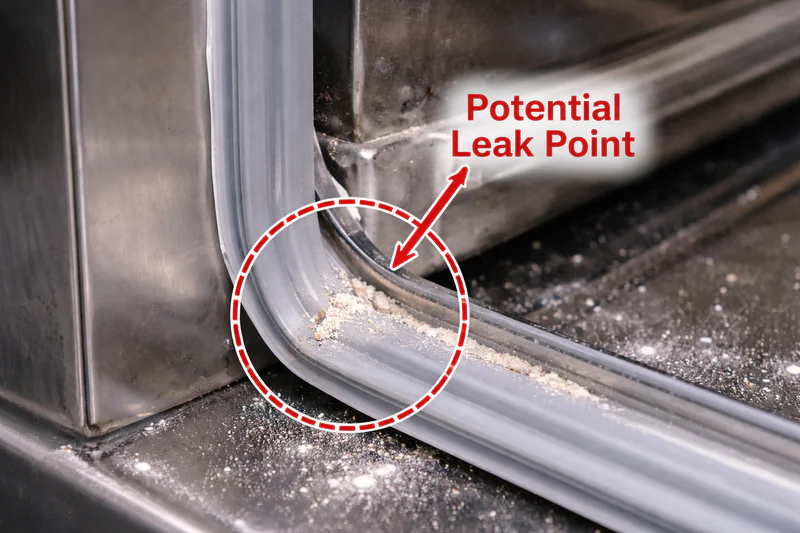
- The Scenario: You push a trolley in. A few sesame seeds fall off the bagel. They land on the bottom door track. You close the heavy door. The rubber gasket presses against the seeds, not the steel.
- The Result: Air rushes in through that tiny gap. The pump works at 100% capacity, but the pressure stays at 500mbar instead of dropping to 20mbar.
- The Fix: Open the door. Run your finger along the entire rubber seal. Wipe the stainless steel frame with a damp cloth. Close it again. You will likely see the pressure drop instantly.
2. The Water Drain Valve2:
At the bottom of the chamber, there is a drain to let out the water that we pull from the bread.
- The Mechanism: This valve should close automatically when the cycle starts.
- The Failure: If a piece of crust gets stuck in the valve, it stays slightly open. The machine then tries to suck the vacuum, but it pulls air up from the drain pipe.
- The Check: Listen. Put your ear near the drain pipe. If you hear a sucking sound, the valve is dirty. You need to open it, clean it, and close it.
3. The "Drop Test":
If you cannot find the leak, perform a "Drop Test."
- Run the machine empty to 50 mbar.
- Stop the machine (Emergency Stop) so the valves close but the vacuum stays.
- Watch the gauge.
- If the number rises very fast (e.g., from 50 to 100 in 10 seconds), you have a big leak.
- If it holds steady, your machine is fine, and the problem might be the product itself (too much steam).
| Symptom | Likely Cause | Immediate Action |
|---|---|---|
| Gauge stops at 500mbar | Large Air Leak | Check Door Seal & Drain Valve. |
| Gauge drops very slowly | Small Leak / Pump Oil | Check Oil Level & Pneumatic Hoses. |
| "Vacuum Time-Out" Alarm | Leak > Pump Capacity | Clean Gasket & Restart. |
| Hissing Sound | Loose Air Hose | Tighten clamps on blue air tubes. |
Why Is the Bread Still Hot After the Cooling Cycle Finishes?
You open the door expecting cool bread, but the center is still steaming. This ruins your slicing process and makes you doubt the machine’s reliability.
If the bread is hot, the machine’s "brain" received the wrong data. This is typically caused by incorrect core probe placement (not in the center) or a damaged sensor cable. The machine stopped early because it thought the job was done.
The False Positive
This is the most frustrating issue for Quality Managers like Sophia. The machine says "Cycle Complete," the screen shows "End Temp: 30°C," but the bread is 70°C inside.
The machine is not lying; it is just confused. It operates based on the information the probe gives it. If the probe says the bread is cold, the machine stops.
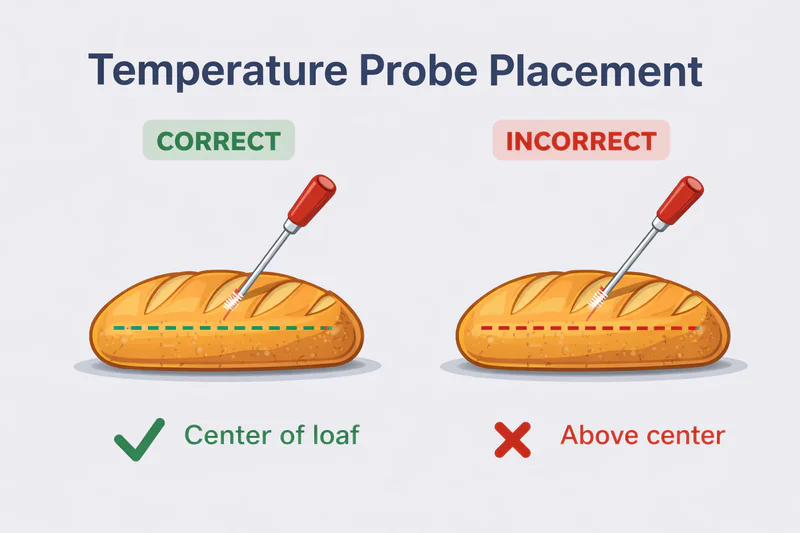
1. The "Lazy Probe" Error:
- The Mistake: An operator is in a rush. They poke the probe into the side of the loaf, but not deep enough. The tip of the needle is only 1 cm inside the crust.
- The Physics: The crust cools down in 30 seconds. The center takes 4 minutes.
- The Result: The probe reads 30°C almost instantly. The machine stops. The center of the loaf never had a chance to boil off the heat. The operator unloads the bread, and 20 minutes later, the slicer blades get gummed up with warm dough.
- The Solution: You must train staff to visualize the "Geometric Center." The needle must be buried deep in the thickest part of the product.
2. The "Pan Touch" Error:
- The Mistake: The operator pushes the needle all the way through the bread until it hits the metal baking tray.
- The Physics: The metal tray cools down very fast because it conducts heat.
- The Result: The probe measures the temperature of the metal tray, not the bread. The cycle ends prematurely.
3. The Damaged Sensor3:
- The Symptom: The screen shows the temperature jumping around. It reads 90°C, then 20°C, then 50°C in one second.
- The Cause: The wire inside the cable is broken. This often happens if operators pull the probe by the cord instead of the handle, or if the door closes on the cable.
- The Check: Place the probe in a cup of ice water. It should read 0°C steadily. If it jumps, throw it away and plug in your spare probe.
4. The Recipe Setting4:
Sometimes, a manager changes the recipe.
- Check the "Vacuum Stop Point." Is it set to "Temperature" or "Time"?
- If it is set to "Time" (e.g., 3 minutes) but you put in a double batch of heavy rye bread, 3 minutes is not enough. The physics of evaporation require more time for more mass. Always prefer "Temperature Mode" for consistency.
| Error Type | What Happened | Result | How to Prevent |
|---|---|---|---|
| Shallow Probe | Tip is near crust. | Cycle too short. | Mark probe depth with tape. |
| Metal Contact | Tip touches tray. | False low reading. | Insert at an angle. |
| Broken Wire | Erratic signal. | Random stops. | Weekly cable inspection. |
| Wrong Mode | Set to Time, not Temp. | Under-cooling. | Lock HMI settings with password. |
What Should You Do When the "Overload" or "Water Flow" Alarm Sounds?
The buzzer screams and a red light flashes. You freeze, thinking the motor has burned out, but the machine is likely just protecting itself from a bad environment.
Alarms like "Overload" or "High Temperature" mean the vacuum pump is working too hard or not getting enough cooling. Check that your water chiller is running, the filters are clean, and the ambient room temperature isn’t too hot.
Decoding the Alarms
Alarms are not death sentences; they are cries for help.
The machine has sensors that monitor Amps (Electricity), Temperature (Heat), and Flow (Water). If any of these go outside the safe zone, the PLC kills the power to save the expensive components.
1. "Pump Overload5" (The most common alarm):
This means the electric motor is drawing too much current.
- Cause A: Exhaust Blockage. The oil mist filters are clogged. The pump is trying to push air out, but the filters are blocked with old oil and carbon. It is like trying to run while breathing through a straw. The motor works harder and harder until the thermal relay trips.
- Fix: Check the pressure gauge on the exhaust box. If it is high, change the filters.
- Cause B: Low Voltage. In some of my clients’ factories in developing areas, the factory voltage drops when all ovens are on. If voltage drops, amperage goes up.
- Fix: You might need a voltage stabilizer.
2. "Water Flow Failure":
Our pumps are water-cooled. If the water stops, the pump overheats and seizes.
- The Sensor: There is a flow switch on the pipe. If it doesn’t feel water moving, it stops the machine.
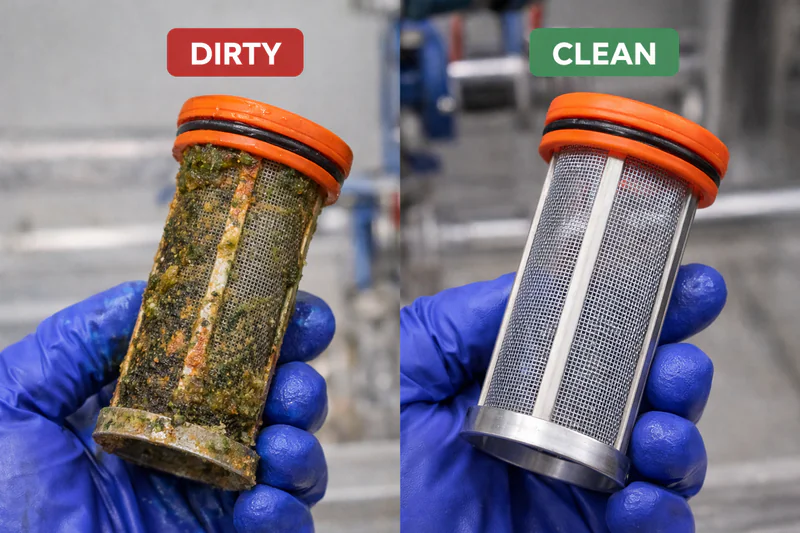
- The Culprit: The "Y-Strainer6." This is a small mesh filter on the water inlet.
- The Scenario: Over time, algae, rust from old pipes, or even Teflon tape can clog this mesh.
- The Fix: Unscrew the cap of the Y-Strainer6 (make sure water is off!). Pull out the mesh screen. Rinse it under a tap. Put it back. This fixes the "Flow Alarm" 99% of the time.
3. "Pump High Temperature7":
This is related to the water flow but can also be the oil.
- Dirty Oil: If the oil is black and thick (sludge), it causes friction. Friction creates heat.
- Room Temp: If you put the vacuum cooler in a room that is 45°C (next to the ovens) and the cooling fan is clogged with flour, the motor simply cannot cool down.
- The Fix: Check the oil color. Clean the fan cover on the motor. Ensure the water chiller is actually turning on (sometimes the chiller tripped, but nobody noticed).
| Alarm Name | What it Means | First Thing to Check | Second Thing to Check |
|---|---|---|---|
| Overload | High Amps | Exhaust Filters (Clogged?) | Input Voltage (Stable?) |
| Flow Fault | No Water | Y-Strainer6 (Dirty?) | Chiller Pump (Running?) |
| High Temp | Pump > 100°C | Water Supply (On?) | Oil Quality (Black?) |
| Door Fault | Safety Lock | Door Track (Debris?) | Compressed Air (Pressure?) |
Conclusion
When your vacuum cooler stops, do not panic. Start with the basics: Is the door seal clean? Is the probe in the center? Is the water filter clear? By checking these three things, you can solve the majority of issues without waiting for a technician, keeping your bakery running smoothly and your bread perfectly fresh.
-
A well-maintained Door Gasket is essential for optimal vacuum performance; learn how to ensure yours is in top shape. ↩
-
Troubleshooting the Water Drain Valve can prevent air leaks and improve machine efficiency; find expert tips here. ↩
-
Learn how to identify and troubleshoot a damaged sensor to ensure consistent baking results. ↩
-
Explore best practices for recipe settings to enhance baking efficiency and product quality. ↩
-
Understanding pump overload can help prevent costly downtime and ensure efficient operation. ↩
-
Cleaning a Y-Strainer is crucial for maintaining water flow and preventing pump failures. ↩ ↩ ↩
-
Learn how high temperatures affect pump efficiency and longevity to avoid operational issues. ↩

Mila
You May Also Like

When Should You NOT Use Vacuum Cooling for Your Bakery?
Are you tired of waiting hours for your bread to cool down while your profits evaporate? You might think vacuum

Is Your Cooling Strategy Burning Your Profits? A Cost-Benefit Analysis of Vacuum vs. Conventional Cooling
As a bakery owner, you look at your balance sheet every month. You see the cost of ingredients, labor, and
Hybrid Cooling Solutions: Can Combining Vacuum and Traditional Methods Save Your Bakery?
Are you torn between the speed of new technology and the reliability of traditional freezing? Many bakery owners feel they
Blast Freezers vs Vacuum Coolers: Which Is the Right Choice for Your Bakery?
Are you tired of watching your freshly baked bread sit on racks for hours, taking up valuable space while you

Bakery Vacuum Cooling vs Spiral Cooling Systems: Which Is Better for Your Business?
Are you struggling with slow production lines because your bread takes forever to cool down? You are not alone. Cooling
Is a Vacuum Cooler the Missing Ingredient in Your Hotel or Restaurant Bakery?
Imagine your kitchen is in full swing, and the freshly baked bread is finally out of the oven, but it
Can One Cooling System Handle Your Entire Bakery Menu?
You juggle sourdough, delicate pastries, and frozen dough lines daily. Yet, one cooling mistake ruins the texture of your artisan

Is Your Frozen Dough Production Losing Quality Before It Hits the Freezer?
You watch your energy bills climb month after month while your blast freezers work overtime. You see production bottlenecks form
How Can Organic Bakeries Extend Shelf Life Without Preservatives?
You pour your heart into sourcing the finest organic flours and perfecting natural fermentation, only to watch your hard work
Can Vacuum Cooling Finally Fix the "Gummy" Texture in Gluten-Free Bread?
You watch your perfectly risen gluten-free loaves come out of the oven, only to see them sink or turn gummy